Kant AI
400+ models in one chat
Bring your own key if you like.
Everything you need for your editing
Try for freeFor Windows and macOS · After Effects & Premiere Pro
Editors trust us,
working with creators, artists
and companies like
Kant AI
Bring your own key if you like.
Tools
Subtitles, beat markers, background removal, Audio Pack, Video Pack, video download by link and upscaling in Re:Master.
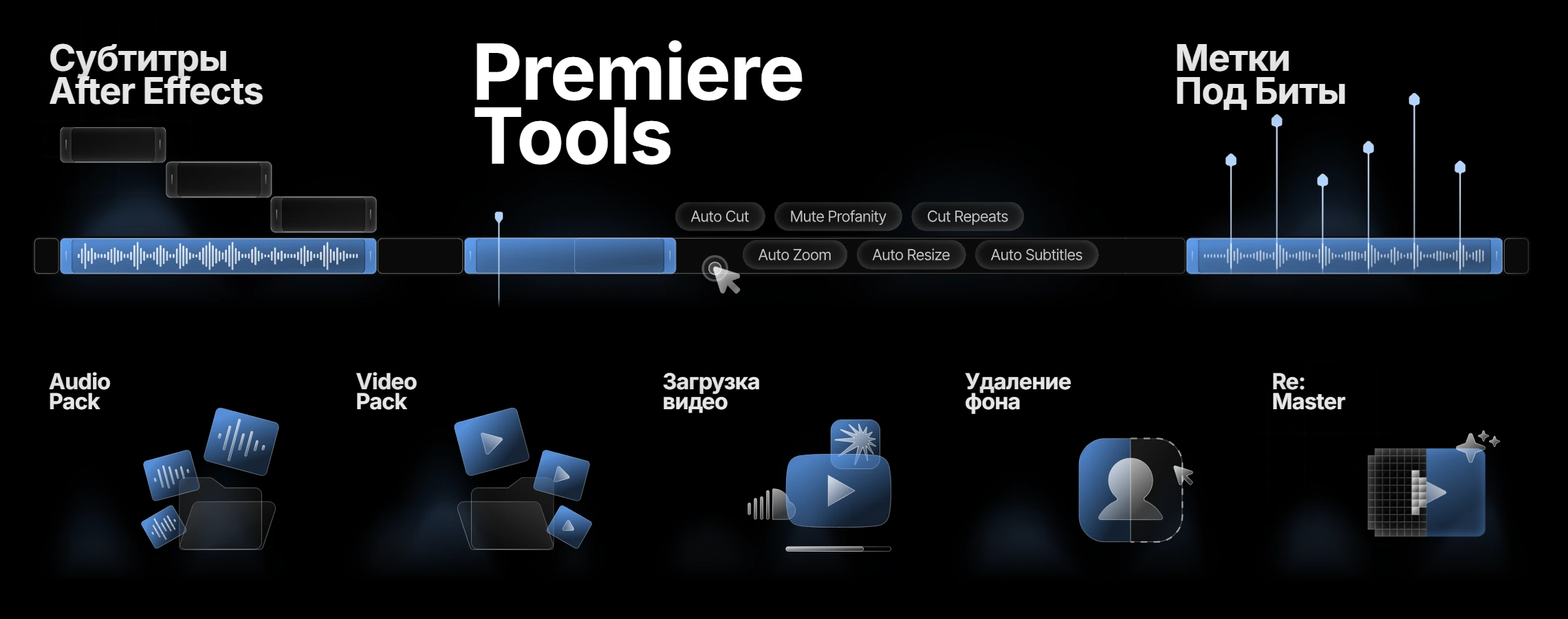
Tools · Subtitles
Kant quickly transcribes and translates speech in 100 languages.
Tools · Beat markers
Kant finds the hits in a track and drops markers in After Effects and Premiere Pro. Sensitivity and the minimum gap are yours to set.
Tools · Audio Pack
Listen to a sound and send it to After Effects or Premiere Pro. Collections, favorites and your own packs are there too.
Tools · Video Pack
A clip from Video Pack lands in After Effects or Premiere Pro with one button. Collections, favorites and your own packs are there too.
Tools · Video download
Not only YouTube: SoundCloud, TikTok, Instagram, Vimeo, VK, Twitch and other sites. Paste a link and get the file in your folder.
Premiere Tools · Auto Cut
Auto Cut finds the silence across the whole timeline and joins the clips in Premiere Pro. Cut Repeats, Mute Profanity, Auto Highlights, Auto Zoom, Auto Resize, Auto Subtitles and Auto B-Roll live there too.
AE Console
Search by name and drop texts, effects, Market templates and tools into your composition.
Tools Pro
Effects
80 presets for After Effects: Colorize, Effects, Shakes and One Frames. 74 more for Premiere Pro: hits, flashes, shakes, wipes, CRT. Each has a live preview and applies in one click.
Object
Layers and whole compositions sit in your library and go into any project.
Market
After Effects templates from Kant creators. Download straight into your project; Extended adds Object and older AE versions.
With Kant, the client will think you spent all night on the order
Every system in one walkthrough. Timestamps are in the post.
Watch on TelegramEverything starts in your account.
Start for freeUse Telegram or a linked Google account.
Try 10 actions for free or choose a plan.
Download the app and connect it to your editor. The guide is in your account.
Still have a question? We are here.
Contact supportAn app that runs next to After Effects and Premiere Pro and takes over the routine: subtitles, cutting pauses, beat markers, titles, effects, templates and sounds. Plus the Clippy AI assistant. What you get depends on your plan.
Yes. New accounts get 10 free actions, no card needed. Grab them in your account and decide on a plan later.
Windows and macOS. Kant connects to After Effects and Premiere Pro; requirements and setup are in the knowledge base, and support helps if something does not connect.
Basic gives you Clippy, Audio Pack, Tools Pro and video download. Pro adds subtitles in AE, Premiere Tools, effects and beat markers. Extended also unlocks Video Pack, upscaling, «Download to Object» and Market templates for older After Effects versions. Details are on the pricing page.
Open your account, activate access and go to the installation section. The Windows and macOS versions, your key and a short guide are there.
10 actions free. Decide what comes next.
Open KantView plans